







You have just sent an email to your manager.
It is polite, but you are frustrated. You explain why a decision makes no sense, mention a colleague who has made the situation worse, and ask whether management has any idea how much pressure the team is under.
You click Send.
For a moment, you feel better.
Then another thought crosses your mind: What if someone else reads this?
Perhaps your manager forwards it to HR. Perhaps an IT administrator is asked to investigate an issue involving your account. Perhaps the company needs to retrieve correspondence after an employee leaves.
Or perhaps you simply assumed that because the email sits inside your personal inbox, nobody else can see it.
Here is the uncomfortable reality: a work email account is not the same as a private email account, and a message being addressed to one person does not necessarily mean only that person can access it.
That does not mean your employer is automatically reading every message you send. Nor does it mean your workplace has unlimited legal permission to inspect your correspondence.
It means the privacy you assume you have may depend on who controls the account, how the organisation’s systems are configured, what its policies permit and why access is being sought.
And that is worth understanding before you send your next message.
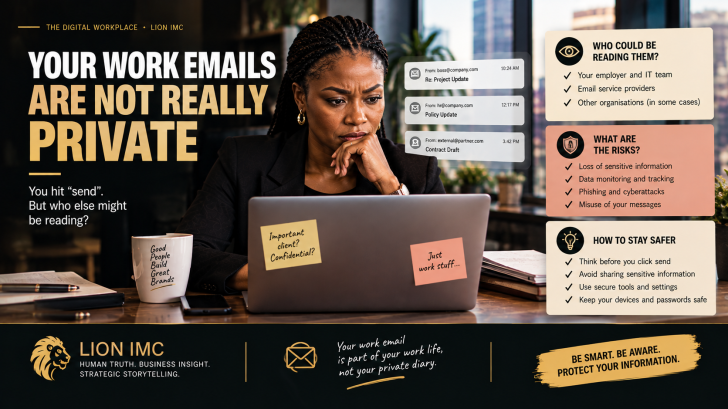
Who might be able to read your work emails?
When you open your work inbox, it feels personal. Your name appears at the top. Your password gets you in. Your messages arrive directly to you.
But the account usually operates within an organisation’s technology environment.
If your employer uses Microsoft 365, for example, authorised administrators can grant designated users permission to read and manage another employee’s mailbox. Microsoft documents this functionality as a standard administrative feature. See Microsoft’s mailbox-access guidance.
Depending on the organisation’s systems, permissions and policies, access may be granted for legitimate business reasons, such as maintaining operations, investigating a security incident or ensuring that important client correspondence remains accessible when an employee is absent or leaves the company.
Other systems may retain messages, log account activity, apply security filters or scan attachments for malicious content.
There are important distinctions here. Having technical capability does not mean every manager can casually open every employee’s inbox. Ordinary colleagues may have no access at all. Access may require specific permissions, authorisation and an auditable process.
And an email service provider’s technical ability to process messages does not mean its employees are routinely reading their contents.
The point is not that somebody is necessarily watching your inbox.
The point is that your work inbox exists within a system you do not entirely control.
The email you thought was between you and your colleague
Imagine you send a colleague a message saying:
“Please don’t mention this in the meeting, but I think the director has completely mishandled this project.”
You believe you are having a private conversation.
But what happens if the project becomes the subject of a formal investigation? What if the colleague forwards your message? What if the organisation needs to preserve relevant correspondence? Or what if the company has a policy allowing authorised review of work communications under defined circumstances?
Your message may become part of a much wider conversation than you intended.
This is one reason workplace emails deserve more care than casual chats. They can be forwarded, stored, searched, retained and produced later as part of an internal process or legal dispute, depending on the circumstances and applicable rules.
Even a message you delete may remain in backups, retention systems or other recipients’ inboxes. The exact position depends on the platform and the organisation’s configuration.
And remember: your colleague does not need IT access to share your email. One click on Forward can do the job.
That is why the first question to ask before sending a sensitive email is not simply, “Do I trust the person receiving this?”
It is also, “Would I be comfortable if this message were seen by someone else who has a legitimate reason to review it?”
You do not have to write every email as though it will appear on a billboard. You should, however, understand that digital correspondence can travel further than the original sender intended.
Can your employer monitor your work emails?
The answer depends on the jurisdiction, the purpose of the monitoring, the organisation’s policies and the circumstances.
Employers may have legitimate reasons to monitor work communications: protecting confidential information, detecting cyberattacks, investigating suspected misconduct, complying with regulatory obligations or maintaining business continuity.
But the existence of a business reason does not automatically make every form of monitoring appropriate.
The UK’s Information Commissioner’s Office, for example, says organisations considering monitoring workplace emails and messages should have a clear purpose, ensure the monitoring is necessary and proportionate, and inform workers about it. This is UK guidance, not a statement of Nigerian law, but it illustrates the principles that responsible organisations should consider. Read the ICO’s guidance.
For Nigerian workplaces, the Nigeria Data Protection Act 2023 provides an important legal framework for handling personal data. The Nigeria Data Protection Commission publishes the Act and guidance on data-protection rights and responsibilities. Read the Nigeria Data Protection Act 2023.
That framework does not mean that all workplace email monitoring is automatically prohibited—or that employers have unrestricted access to every message. The legality of a particular practice depends on the facts, the applicable legal basis, the data involved and the way monitoring is conducted.
A responsible employer should have clear policies explaining how work accounts are used, what monitoring may occur, who may access communications and how information is protected.
If you are unsure, check your employment contract, staff handbook, acceptable-use policy and any privacy notice that applies to your work systems.
The important distinction is this: an employer’s control of a work account is not a blank cheque to ignore privacy, confidentiality or applicable law.
What about emails sent to HR?
This is where employees sometimes make a costly assumption.
You may send HR an email about a difficult manager, an uncomfortable workplace experience, a salary dispute or a concern about how you have been treated. Because HR is responsible for employee matters, you may assume that your message will remain strictly between you and the HR officer receiving it.
But HR is part of the organisation, not necessarily an independent confidential adviser.
Depending on the nature of the complaint and the organisation’s procedures, HR may need to share relevant information with management, legal advisers, investigators or other people responsible for addressing the issue. There may also be circumstances in which confidentiality is limited by legal or regulatory obligations.
This does not mean you should avoid reporting problems. It means you should understand the process and communicate with care.
If you are raising a serious allegation, distinguish what you personally observed from what you suspect. Include relevant dates and evidence. Avoid unnecessary personal attacks. If the matter is sensitive, ask how the complaint will be handled and who may need to see it.
Where you need independent legal advice, a confidential professional consultation may be more appropriate than assuming that a company email to HR carries the same protections.
And if the matter involves potential wrongdoing, do not assume that sending an email automatically gives you legal protection as a whistleblower. The applicable protections depend on the circumstances and relevant law.
The biggest mistake: treating your work inbox like your private diary
Not every risky work email contains confidential business information.
Sometimes the risk is simply that we write differently when we believe nobody else will see what we say.
We vent about our manager. We make jokes about colleagues. We send personal messages during office hours. We forward a document to a friend because it is easier than finding another way to share it. We use our work address to register for a personal service and forget that the account belongs to the organisation.
Each action may seem harmless in isolation. Together, they can create unnecessary exposure.
Consider these five situations:
The angry email
You write in anger and send a message you would never say in a formal meeting. Your frustration may be understandable, but the wording can distract from the issue you actually need resolved.
The confidential attachment
You forward a client proposal, payroll spreadsheet or internal report to a personal address so you can work on it later. You may unintentionally expose information you have a duty to protect.
The personal conversation
You use your work account for intimate personal matters, assuming that a password makes the correspondence exclusively yours.
The AI shortcut
You copy an internal email or confidential document into an external AI tool to summarise or rewrite it without checking whether that use is permitted. You may create a separate data-security problem.
The exit-day surprise
You leave a company assuming that your mailbox and its contents will disappear with you. In some systems, the organisation can retain the mailbox, restrict your access and arrange authorised access to business correspondence after your departure.
The common thread is not that employees should become paranoid. It is that workplace technology has consequences beyond the moment we click Send.
How to protect yourself without becoming afraid of email
You do not need to stop communicating openly with colleagues. You need better habits around the information you send and the systems you use.
- Keep personal correspondence personal. Use a personal email account for personal matters where appropriate, and follow your employer’s rules about personal use of work devices and accounts.
- Pause before sending an emotional message. Draft it, step away if possible, and reread it with the intended recipient and purpose in mind.
- Check recipients and attachments. A mistaken address or the wrong file can expose sensitive information in seconds.
- Respect confidentiality. Do not send client records, internal financial information, employee details or other restricted material to personal accounts or external AI tools unless the action is authorised and appropriately secured.
- Use approved systems and security settings. Follow company guidance, use multifactor authentication where available, and never share your password.
- Understand the policy. Find out whether your employer monitors work email, what the stated purposes are, and who is authorised to access messages.
- Do not assume deletion erases every copy. If you have sent sensitive information to the wrong person, follow your organisation’s incident-reporting process rather than relying on deleting the message.
And one more thing: if you need to discuss misconduct, discrimination, harassment or another serious workplace issue, do not let concerns about email privacy prevent you from seeking appropriate help. Choose a suitable reporting channel, keep factual records and seek independent advice where necessary.
What responsible employers should remember
There is a management lesson here too.
The fact that an organisation can technically access workplace communications does not mean it should treat employees as though they have no legitimate privacy interests.
Monitoring that is secretive, excessive or poorly explained can undermine trust. Employees who believe every message may be scrutinised without clear limits may become less willing to raise concerns, admit mistakes or communicate candidly.
Organisations should therefore establish clear policies, limit access to authorised personnel, protect the information they collect and explain the purposes and boundaries of monitoring.
They should also distinguish between legitimate business oversight and intrusive curiosity.
A company may need access to an employee’s business correspondence to protect a client relationship or investigate a security incident. That is different from a manager browsing private messages simply because they can.
Responsible oversight protects the business without treating every employee as a suspect.
The Lion Take
Your work email is a professional tool, a business record and a communication channel operating within systems your employer may control.
It is not necessarily a private diary.
That does not mean your boss is reading every message. It does not mean every workplace email is fair game. And it does not mean you should communicate in constant fear of being misunderstood.
It means you should understand the boundaries of the account, the policies that govern it and the potential consequences of what you send.
Before you click Send, ask yourself one simple question:
If this email were legitimately reviewed outside the conversation I intended, would I still be comfortable standing behind what I wrote?
That is not a reason to silence yourself. It is a reason to communicate with intention.
The big question
Have you ever sent a work email you later wished you could take back or assumed a message was private, only to discover that someone else had seen it?
Where should the boundary lie between an employer’s right to protect its business and an employee’s right to privacy?